
Migrating Direct Debit Mandates
Overview
Existing Direct Debit mandates move to Acquired through the Bacs bulk change process: on a single agreed date, your mandates are cancelled with your current provider and reauthorised under the GoCardless Service User Number (SUN). Your customers keep their original authorisation and take no action.
Acquired is an integrated partner of GoCardless. The migration is therefore run on the GoCardless side. You upload a CSV of your existing mandates to GoCardless, and Acquired receives the resulting mandates by webhook and issues an Acquired mandate_id for each one.
This page covers:
- What you need in place before the migration starts
- The end-to-end process and who does what
- The Bacs bulk change timeline
- The data points required in your mandate CSV
- How mandates are mapped back to your customer records
- The outcome file Acquired returns to you
Before you begin
Five things must be in place before a migration date can be agreed.
- A GoCardless account connected to Acquired. Follow Connecting a GoCardless account to Acquired. Direct Debit must be enabled on your Acquired account.
- Agreement from your existing provider. Your current Direct Debit provider or bureau must agree to the transfer and assist with it. Without their agreement the bulk change cannot proceed.
- Sponsor bank approval. The sponsor bank behind the receiving SUN must agree to the change and to its size and date.
- A complete export of your existing mandates. Your current provider supplies this. Check it contains bank account details, customer names, addresses and email addresses before you start the migration.
- A unique reference for every mandate. You need an identifier that ties each mandate back to the customer record in your own system, typically a membership number, customer ID or email address. See Mapping mandates back to your records below.
NoteMandates can only be transferred in bulk, not individually. If you need to move a small number of customers, they will need to set up new mandates in the normal way.
How the migration works
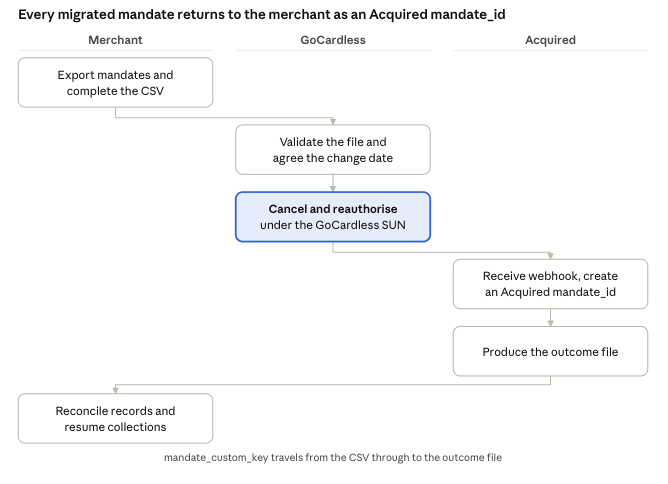
The merchant supplies the data once and receives it back enriched: the reference in column Q of the CSV is what links the Acquired mandate_id in the outcome file to the right customer record.
Roles and responsibilities
| Stage | Merchant | GoCardless | Acquired |
|---|---|---|---|
| Provider and sponsor bank agreement | Obtains sign-off from the existing provider | Liaises with the sponsor bank, submits the Bulk Change Deed and Notification of Change Form | Coordinates dates and acts as point of contact |
| Mandate data | Exports mandates from the existing provider and completes the CSV template | Validates the file and flags errors | No action; the file is handled between the merchant and GoCardless |
| Customer notification | Sends the advance notice to payers | Supplies bank-approved template wording | Reviews wording on request |
| Bulk change date | No action | Cancels the old mandates and creates the new ones | Monitors incoming webhooks |
| Mandate creation at Acquired | No action | Sends mandate webhooks to Acquired | Creates an Acquired mandate_id for each mandate |
| Reconciliation | Loads the outcome file into their own system | No action | Produces and delivers the outcome file |
| Resuming collections | Submits payments through Acquired against the new mandate_id | Submits to Bacs under the GoCardless SUN | Routes payments to GoCardless |
Migration timeline
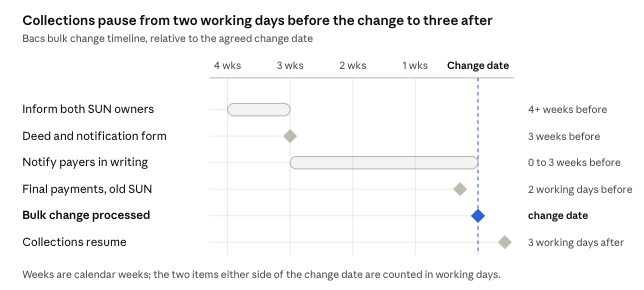
Timings are the same for every mandate type, but the elapsed time depends on how quickly the existing provider, the sponsor bank and your own data preparation move. Prepare and submit the mandate CSV in the window between informing the SUN owners and notifying payers, so the file is validated well before the change date.
Collections cannot be taken against a mandate for a window of around five working days: from two working days before the change date, when the final submission under the old SUN must be made, to three working days after it, when submissions under the new SUN become possible.
Consider migrating in phasesWork out when collections fall due across your book, then set each bulk change date so that the five working day gap does not land on them. Where collection dates vary widely, split the migration into phases rather than moving everything on one date.
For example, mandates with a collection due on 5 October belong in a phase whose change date falls after 5 October. The collection is taken as normal under the old SUN, the mandate then moves to Acquired, and processing resumes three working days after the change date.
Step 1: Prepare your mandate CSV
GoCardless supply a CSV template with eighteen columns, A to R. Complete one row per mandate. Column order must not be changed.
| Column | Field | Required | Notes |
|---|---|---|---|
| A, B | customer.given_name, customer.family_name | One of these or C | Given name and surname in separate columns. If your export holds the full name in a single cell, split it with Excel's Text to Columns. Example: John, Smith |
| C | customer.company_name | One of this or A and B | Use instead of given and family name for business customers. Example: John's Gym Ltd |
| D | customer.email | Yes | A valid address is required per customer so GoCardless can send payment notifications. Example: [email protected] |
| E | customer.address_line1 | Yes | Bacs requires an address against each mandate. Example: 65 Goswell Road |
| F, G | customer.address_line2, customer.address_line3 | No | |
| H | customer.city | Yes | Example: London |
| I | customer.postal_code | Yes | With or without spaces. Example: EC1V 7EN |
| J | customer.country_code | Yes | Two characters only. Use GB for UK addresses. |
| K | customer.phone_number | No | Example: +44 20 8338 9540 |
| L | bank_account.account_holder_name | Yes | Separate from the name fields, as the account holder name can differ from the customer name. Example: John Smith |
| M | bank_account.account_number | Yes | 8 digits. A GBP account is required for Bacs. Example: 55779911 |
| N | bank_account.branch_code | Yes | Sort code, 6 digits. Hyphens and spaces are accepted. Example: 200000 |
| O | bank_account.metadata.bank_custom_key | No | Searchable custom reference against the bank account. Example: JAM12251 |
| P | customer.metadata.custom_reference | No | Searchable custom reference against the customer. Example: GYM441231 |
| Q | mandate.metadata.mandate_custom_key | Yes for Acquired | Your own reference for the mandate. See the next section. Example: WIL12251 |
| R | customer.language | No | Sets the language of customer notifications. Example: en |
Source: Client migration data requirements (Bacs), GoCardless.
Common data issuesFull names held in one cell, missing address lines, missing email addresses, sort codes stored without leading zeros, and accounts closed since the last collection. Fixing these before submission avoids a delay to the change date.
Mapping mandates back to your records
Column Q, mandate.metadata.mandate_custom_key, is the only field that travels from your CSV through GoCardless and back to you in the Acquired outcome file. It is how you reconcile a migrated mandate to the customer record in your own system.
GoCardless treat column Q as optional. For a migration onto Acquired it is mandatory. Without it there is no reliable key to return in the outcome file, and mandates have to be matched manually on name and bank details.
When populating column Q:
- Use a value that already exists in your system, such as a customer ID, membership number, contract reference or subscription ID.
- Keep it unique per mandate. If one customer holds two mandates, each needs its own value.
- Avoid values that change over time, such as an email address the customer may update.
- Keep it free of commas, quotation marks and line breaks so the CSV parses cleanly.
The value is stored against the mandate in your GoCardless dashboard and is searchable there.
Step 2: Upload the CSV to GoCardless
Send the completed CSV to GoCardless using the secure upload link they provide for your migration. Do not email mandate data as a plain attachment.
GoCardless validate the file and return any rows that fail. Typical rejections are an invalid sort code or account number, a missing address line 1, city, postcode or country code, a missing email address, and duplicate rows for the same bank account.
Correct the rejected rows and resubmit. The file must be clean and accepted before the change date is confirmed with the sponsor bank, so allow time for at least one round of corrections.
Step 3: The bulk change date
On the agreed change date, the original mandates are cancelled at the same moment as the replacement mandates are created under the GoCardless SUN. The two actions happen together, so no customer is left without a live mandate.
What changes on the mandate is the service user name, the reference and the SUN. The customer's underlying authorisation is unchanged and carries over, which is why no customer action is needed.
Submit your final payments under the old SUN at least two working days before the change date. Do not schedule collections on the change date itself.
Expect customer queriesPayers will see a new service user name on their bank statement from their next collection. Brief your support team on the new name before the change date.
Step 4: Webhooks and the Acquired mandate_id
As each replacement mandate is created, GoCardless send a webhook to Acquired carrying the new mandate details, including the customer, the bank account and the mandate.metadata.mandate_custom_key from column Q of your CSV.
On receipt, Acquired create a corresponding record on our side and issue an Acquired mandate_id. This is the identifier you use for every subsequent Acquired API call for that customer. It is not the GoCardless mandate ID, and the two should not be used interchangeably.
Mandates arrive over a short window rather than all at once, so the set is not complete until GoCardless confirm the bulk change has finished processing. Wait for the outcome file rather than polling for individual mandates.
Step 5: The outcome file
Once the bulk change has completed, Acquired produce an outcome file and send it to you. It is the authoritative record of the migration and the only place the Acquired mandate_id is returned in bulk.
The file contains one row per mandate:
| Field | Description |
|---|---|
mandate_id | The Acquired mandate identifier. Store this against your customer record and use it for all subsequent collections. |
customer_id | The Acquired customer identifier the mandate sits under. One customer can hold more than one mandate, so store it alongside the mandate_id rather than in place of it. |
mandate_custom_key | The value you supplied in column Q. Use this as the join key to your own records. |
| Customer details | Name, email and address as migrated, so you can verify the match. |
| Status | Whether the mandate migrated successfully. |
To reconcile:
- Join the outcome file to your customer records on
mandate_custom_key. - Store the Acquired
mandate_idagainst each record. - Review any row that did not migrate successfully, and any customer in your source file with no corresponding row.
- Confirm the row count matches the number of mandates you submitted.
Customers that do not appear in the outcome file have not been migrated and will need to set up a new mandate. Raise these with your Acquired contact before contacting the customer.
Resuming collections
Payments can be submitted under the new SUN from three working days after the change date. Submit them through Acquired in the normal way, using the Acquired mandate_id from the outcome file.
Standard Bacs timings apply to the first collection, so allow the usual three working day cycle on top. Count working days only; weekends and bank holidays do not count.
Set your first collection date with that in mind. If a customer's normal collection date falls inside the window between the final old-SUN submission and the first permitted new-SUN submission, that collection will need to move. Tell the affected customers in your advance notice.
Notifying your customers
You must notify every affected payer in writing before the change date. This is a Bacs requirement, not a courtesy.
- The wording must be bank-approved. GoCardless provide an example notification letter.
- Notice goes out in the three weeks before the change date.
- Customers do not need to opt in or complete anything. Their original authorisation to you remains valid.
- The notice should state the new service user name that will appear on their bank statement, and flag any change to their collection date.
Send the notification yourself, from your own brand. Acquired and GoCardless do not send it on your behalf, though both will review your wording on request.
FAQs
Do my customers need to do anything?
No. Their original authorisation carries over and no re-signing is required.
Can I keep collecting during the migration?
Yes, apart from the gap around the change date: no submissions under the old SUN within two working days before it, and none under the new SUN until three working days after it.
Do I need my current provider's agreement?
Yes. The bulk change cannot proceed without it.
Can I migrate part of my book?
The bulk change moves the mandates included in the file you submit. Mandates left out stay with your existing provider, so you would be running two providers in parallel.
What if a customer's bank details have changed since the export?
The mandate will fail validation or fail at the change date. Correct the details with the customer and set up a new mandate through Acquired afterwards.
How long does the whole process take?
Four to six weeks from first contact to change date is typical, but it depends on how quickly the existing provider, the sponsor bank and your own data preparation move.
Can I run payments against the GoCardless mandate ID?
No. Use the Acquired mandate_id from the outcome file for all collections through Acquired.
What happens to failed or disputed payments taken before the migration?
Indemnity claims on pre-migration collections transfer to the new SUN owner under the Bulk Change Deed. Raise any in-flight disputes with your Acquired contact before the change date.
Source for the Bacs process and timeline: Transferring Direct Debit mandates: the bulk change process, GoCardless.
Updated 20 days ago